No-Code Native App Builder for WordPress & Shopify: The Complete Guide to Building Mobile Apps Without Coding


Building a mobile app once meant hiring expensive developers, managing endless development cycles, and investing months—sometimes years before seeing your idea live in the Apple App Store or Google Play.
For businesses running on WordPress or Shopify, going mobile often felt like a luxury reserved for brands with deep pockets, in-house tech teams, and enterprise-level resources.
Meanwhile, mobile users kept growing, customer expectations kept rising, and businesses without an app quietly lost engagement, retention, and revenue to competitors who were already living in their customers’ pockets.
That story is changing—fast. The rise of no-code native app builders has completely rewritten the rules of mobile app development.
Today, store owners, educators, marketplace operators, booking businesses, directory owners, restaurant brands, membership sites, and digital entrepreneurs can transform their existing websites into fully native iOS and Android apps without writing a single line of code, hiring an agency, or spending $20,000 to $100,000 on traditional development.
What once took months can now happen in days. What once required developers can now be done with drag-and-drop simplicity.
In this complete guide, you’ll discover what a no-code native app builder really is, how it works with WordPress and Shopify, why businesses are moving from websites to apps faster than ever, and much more.
What is a No-Code Native App Builder?
A no-code native app builder is a software platform that enables individuals, startups, agencies, and enterprises to design, build, test, and publish fully functional mobile applications for Apple Inc. iOS and Google LLC Android without writing traditional programming code.
Instead of manually developing an app using languages such as Swift, Kotlin, or Java, users create applications through visual interfaces, drag-and-drop components, workflow automation, and prebuilt integrations.
At its core, a no-code native app builder removes the technical barriers of mobile development by transforming complex programming logic into visual actions.
Users can design screens, define user journeys, connect data sources, configure app behavior, and integrate features such as payments, messaging, analytics, authentication, and push notifications through graphical tools rather than code editors.
The platform then compiles or generates the underlying native code needed to run efficiently on mobile operating systems.
How Drag & Drop App Builders Work (Step-by-Step)
A drag-and-drop app builder transforms mobile app development from a code-heavy engineering process into a visual workflow.
Instead of writing thousands of lines of code, users build apps by selecting components, arranging layouts, defining logic, and connecting data through an intuitive interface.
While the experience feels simple on the surface, powerful automation, code generation, APIs, and cloud infrastructure work behind the scenes to convert visual actions into fully functional native applications.
Here’s how the process works step by step.
Step 1: Start with a project or template
Every app begins with a project setup. Most no-code platforms allow users to either:
- Start from scratch
- Choose a prebuilt template
- Clone an existing app
- Import data from another platform
Templates are often designed for specific industries, such as:
- eCommerce
- Food delivery
- Booking
- Education
- Healthcare
- Community platforms
For example, an online store running on Shopify Inc. may choose an eCommerce template, while a content publisher using WordPress Foundation might start with a content-driven app template.
At this stage, users usually configure:
- App name
- Brand colors
- Logo
- Target platforms (iOS, Android, or both)
- Language and region settings
This creates the foundation for the application.
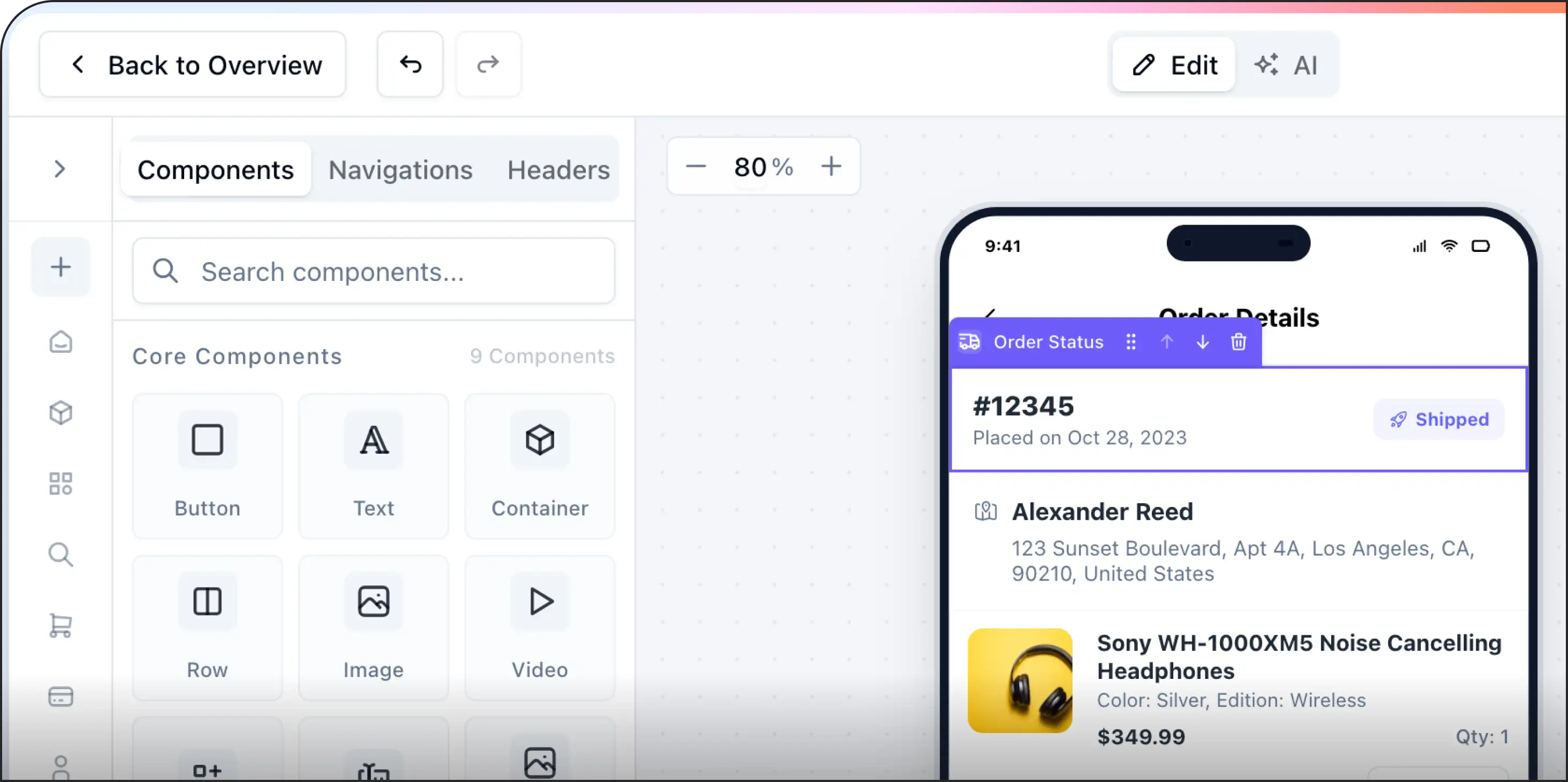
Step 2: Design the user interface with drag & drop
The visual builder opens a canvas representing mobile screens.
Users drag components from a widget library and place them onto the screen, such as:
- Buttons
- Text blocks
- Images
- Product cards
- Search bars
- Navigation menus
- Forms
- Maps
- Video players
Each element can be resized, moved, duplicated, or customized.
For example:
A “Shop Now” button can be dragged onto the homepage, resized, and styled with brand colors—all without touching code.
Behind the scenes, the builder converts these design choices into native UI elements optimized for Apple Inc. iOS and Google LLC Android.
Step 3: Build screen navigation
Apps are made up of multiple screens.
Users visually connect screens to define navigation, such as:
- Home → Product Listing
- Product Listing → Product Details
- Product Details → Checkout
- Checkout → Order Confirmation
Instead of programming routes manually, users simply select:
“When this button is tapped, open this screen.”
Navigation options typically include:
- Tab bars
- Side menus
- Stack navigation
- Popups
- Modals
- Deep links
This defines how users move through the app.
Step 4: Add business logic and user actions
Once screens are designed, the next step is defining app behavior.
Users create workflows such as:
- When the user signs up → create an account
- When the user clicks Buy → add product to cart
- When payment succeeds → send confirmation
- When booking is confirmed → notify the customer
This is usually done through visual logic blocks.
Example workflow:
Button Tap → Validate Input → Save Data → Send Notification → Redirect
No code is written, but behind the scenes, the builder creates event handlers, state management, and API requests.
Step 5: Connect data sources
Apps need dynamic content.
Drag-and-drop builders connect with:
- Databases
- CMS platforms
- APIs
- CRMs
- eCommerce stores
Common integrations include:
- WordPress Foundation
- Shopify Inc.
- Stripe, Inc.
- PayPal Holdings, Inc.
- Google Firebase
For example:
A product grid can automatically pull product data from Shopify.
A blog section can pull articles from WordPress.
A booking form can save data to a cloud database.
This turns static screens into live applications.
Step 6: Enable native device features
To deliver true mobile experiences, users can activate native capabilities such as:
- Camera
- GPS
- Push notifications
- File uploads
- Fingerprint authentication
- Face recognition
- Offline storage
- Bluetooth
For example:
A delivery app may use GPS.
A banking app may use biometric login.
A social app may use the camera.
These features connect through prebuilt modules instead of custom code.
Step 7: Configure user authentication
Most apps need secure user access.
Builders provide authentication options such as:
- Email/password login
- Phone verification
- OTP authentication
- Social login
- Single sign-on
Examples include login via:
- Google LLC
- Meta Platforms, Inc.
- Apple Inc.
The platform manages encryption, token handling, and session management in the background.
Step 8: Preview and test in real time
Before publishing, users can test the app through:
- Browser preview
- Device simulators
- QR code preview
- Test builds
This allows teams to check:
- Screen responsiveness
- Workflow behavior
- API connections
- Performance
- User experience
Bugs can be fixed visually without rebuilding from scratch.
Step 9: Generate native app builds
Once everything is ready, the platform compiles the visual project into native mobile packages:
- IPA for iOS
- APK or AAB for Android
This step converts all design elements, workflows, and integrations into platform-specific code.
Behind the scenes, the builder may generate native components using frameworks or compiled mobile runtimes.
Step 10: Publish to app stores
Finally, users publish the app to:
- Apple App Store
- Google Play
This usually involves:
- App icons
- Screenshots
- Privacy policies
- App descriptions
- Compliance checks
Many no-code platforms also help with store submission and updates.
WordPress vs Shopify App Ecosystem Explained
Both WordPress and Shopify have huge app/plugin ecosystems, but they work very differently. The main difference is flexibility vs simplicity.
Quick Overview
| Feature | WordPress Ecosystem | Shopify Ecosystem |
|---|---|---|
| Core model | Open-source CMS | Hosted ecommerce platform |
| Extensions | Plugins | Apps |
| Typical users | Bloggers, businesses, developers | Online stores and brands |
| Customization | Extremely high | Controlled but easier |
| Hosting | Self-hosted | Hosting included |
| Ease of use | More technical | Beginner-friendly |
| App review process | Less centralized | Strict Shopify approval |
| Ecommerce capability | Via plugins like WooCommerce | Built in |
Imagine building a digital business like building a city.
WordPress gives you empty land, unlimited construction freedom, and thousands of tools created by developers around the world.
You can design skyscrapers, underground tunnels, secret rooms, or entire shopping districts exactly the way you want.
Shopify gives you a modern commercial complex that is already secure, organized, and optimized for selling products.
You simply move in, decorate the store, install extra features, and start selling.
Both ecosystems are powerful, but they are built with completely different philosophies.
The WordPress Universe
Inside WordPress, plugins act like superpowers.
Need ecommerce? Install WooCommerce.
Need advanced SEO? Add Yoast SEO.
Need drag-and-drop design freedom? Use Elementor.
The ecosystem feels like a giant open marketplace where creators constantly invent new tools. Developers can modify almost every layer of the platform.
That freedom makes WordPress incredibly powerful for unique projects, complex websites, and businesses that want complete control.
But freedom comes with responsibility. Sometimes plugins clash like two musicians playing different songs at the same concert.
Updates can break features, security requires attention, and maintenance becomes part of the journey.
WordPress is like owning a custom-built race car. Fast, powerful, endlessly modifiable, but it needs a skilled driver and regular tuning.
The Shopify Universe
Shopify takes a different approach.
Instead of giving you raw building materials, Shopify gives you a polished store already connected to electricity, security systems, payment processing, and customer checkout.
Apps inside Shopify are designed to extend selling power rather than rebuild the platform itself.
Want smarter email marketing? Add Klaviyo.
Want product reviews? Install Judge.me.
Want print-on-demand products? Connect Printful.
Everything is designed to work smoothly inside Shopify’s controlled environment.
The experience feels cleaner and more beginner-friendly because Shopify reviews and manages the ecosystem carefully.
The downside is that customization has boundaries. You can redesign the showroom, but you cannot fully rebuild the foundation underneath it.
Shopify is like driving a luxury electric car. Smooth, reliable, and easy to manage, but you cannot open the engine and redesign everything yourself.
Web App vs Native App vs PWA: What You Should Choose
It feels like three roads to the same destination.
Every modern business eventually faces the same question:
Should we build a web app, a native mobile app, or a Progressive Web App (PWA)?
At first, they may look similar to users. Buttons click. Pages load. Notifications appear.
But underneath, each one is built on a completely different philosophy.
Choosing the wrong path can waste time, money, and momentum.
Choosing the right one can accelerate growth for years.
i. The Web App Experience
A web app lives inside the browser.
Open Chrome, Safari, or Edge, visit a URL, and the application appears instantly. Platforms like online dashboards, booking systems, and collaboration tools often use this model.
Web apps are fast to develop because one codebase works across almost every device. Updates happen instantly without requiring users to download anything from an app store.
The biggest advantage is accessibility. Anyone with a browser can use the app immediately.
The weakness is that browser-based apps cannot always access deep device features smoothly. Performance may also feel less fluid compared to fully native applications.
A web app is like renting a flexible coworking space.
- Easy to enter.
- Easy to maintain.
- Accessible from anywhere.
ii. The Native App Experience
Native apps are built specifically for platforms like iOS or Android.
These apps are downloaded from app stores and installed directly onto the device.
Because they communicate closely with the operating system, they deliver smoother animations, better performance, and deeper hardware integration.
Apps like advanced games, social media platforms, and high-performance editing tools usually rely on native development.
Native apps can fully use:
- camera,
- GPS,
- Bluetooth,
- offline storage,
- background processing,
- and advanced notifications.
The downside is cost and complexity. Building separate apps for iPhone and Android often requires larger teams, longer timelines, and ongoing maintenance for multiple codebases.
A native app is like owning a luxury custom-built house.
- Beautiful.
- Powerful.
- Tailored perfectly to the environment.
- But expensive to build and maintain.
Convert your website into an iOS & Android app in 60 seconds (Join waitlist)
iii. The PWA Experience
A Progressive Web App sits between a web app and a native app.
PWAs run through the browser but behave more like installed mobile apps. Users can add them to the home screen, receive notifications, and sometimes use them offline.
Companies use PWAs to create faster mobile experiences without fully investing in native development.
The beauty of a PWA is balance.
It combines the reach of the web with some of the convenience of mobile apps.
However, PWAs still face limitations on certain operating systems, especially with advanced device integrations.
A PWA is like transforming a website into a lightweight mobile experience without building a full native ecosystem.
Speed vs Power vs Reach
Native apps dominate in performance and deep hardware access.
Web apps dominate in accessibility and development speed.
PWAs attempt to balance both worlds by adding app-like behavior to the browser experience.
The decision is rarely about technology alone. It is usually about business priorities.
When Web Apps Win
Web apps work best when the goal is fast deployment, broad accessibility, and lower development costs.
They are ideal for:
- business dashboards,
- internal tools,
- education platforms,
- and SaaS products.
If users mainly work through browsers, web apps are often enough.
When Native Apps Win
Native apps shine when experience quality matters more than simplicity.
They are ideal for:
- gaming,
- social media,
- video editing,
- fitness tracking,
- banking,
- and high-performance consumer apps.
If the app depends heavily on device hardware or smooth interactions, native development becomes valuable.
When PWAs Win
PWAs are strongest when businesses want mobile convenience without app-store complexity.
- They are especially useful for:
- ecommerce stores,
- news platforms,
- startup MVPs,
- food delivery services,
- and lightweight social platforms.
PWAs can dramatically reduce development costs while still improving mobile engagement.
Benefits of No-Code Mobile App Development
Mobile apps are no longer built only by professional developers with massive budgets.
No-code platforms are making app creation faster, easier, and accessible to almost anyone.
1. The rise of building without coding
Not long ago, creating a mobile app required a full development team, months of engineering work, and a significant budget.
Today, no-code platforms are changing that reality.
With tools like Bubble, Glide, and Adalo, entrepreneurs, students, startups, and small businesses can build mobile applications using visual interfaces instead of traditional programming.
No-code development has transformed app creation from a highly technical process into something far more accessible.
2. Faster development speed
Traditional app development can take months before the first version is ready.
No-code platforms dramatically reduce that timeline.
Instead of writing thousands of lines of code, creators use drag-and-drop builders, templates, and visual workflows to assemble apps quickly.
An idea that once needed a large engineering sprint can now become a working prototype within days.
Speed matters because modern markets move fast. Businesses that launch earlier often learn faster and improve faster.
3. Lower development costs
Hiring mobile developers can be expensive, especially for startups and small businesses.
No-code platforms reduce the financial barrier by removing much of the engineering complexity.
A founder can test an idea without building an entire technical team. Small businesses can launch internal tools or customer apps without investing heavily in custom software development.
This makes innovation more accessible to people who previously could not afford to enter the app market.
4. Easier for non-technical creators
One of the biggest advantages of no-code development is accessibility.
Designers, marketers, teachers, entrepreneurs, and students can build applications without becoming professional programmers.
The process feels more like designing a presentation than engineering software from scratch.
This allows creators to focus more on solving problems and improving user experience rather than debugging complex code.
5. Faster experimentation
No-code platforms encourage rapid experimentation.
- Features can be adjusted quickly.
- Layouts can change instantly.
- New workflows can be tested without long development cycles.
This flexibility is especially valuable for startups building MVPs (Minimum Viable Products). Instead of spending a year developing a product nobody wants, businesses can launch quickly, gather feedback, and improve continuously.
In many cases, speed of learning becomes more important than technical perfection.
6. Simplified maintenance
Traditional apps often require ongoing developer support for updates, bug fixes, compatibility issues, and infrastructure management.
No-code platforms simplify much of this process because the platform provider handles large parts of the backend infrastructure and maintenance.
Updates become easier, hosting is usually included, and deployment processes are more streamlined.
For small teams, this reduction in technical overhead can save enormous time and stress.
7. Better focus on business goals
When businesses spend less energy managing code, they can focus more on customers, branding, marketing, and growth.
No-code development shifts attention away from technical barriers and toward business execution.
Instead of asking,
“How do we build this feature?”
Teams can focus on,
“Will this feature actually help users?”
That mindset often leads to faster business growth and clearer product decisions.
8. Limitations still exist
No-code platforms are powerful, but they are not perfect for every situation.
Highly complex apps, advanced gaming systems, large-scale enterprise platforms, or apps requiring deep hardware integration may still need traditional development.
Performance limitations and platform restrictions can also appear as products scale.
No-code is excellent for speed and accessibility, but not always ideal for unlimited customization.
Limitations of No-Code App Builders (and How to Overcome Them)
No-code platforms make app development faster and more accessible, but they are not perfect solutions for every project.
Understanding their limitations helps businesses choose smarter strategies and avoid scaling problems later.
Customization can be limited
No-code builders are designed to simplify development through templates, visual editors, and prebuilt components.
That simplicity can become restrictive when businesses need highly unique functionality or advanced design control.
Some platforms may not allow deep backend customization, custom animations, or complex workflows beyond their built-in system.
The best way to overcome this limitation is by choosing platforms that support custom code extensions or API integrations. Tools like Bubble and FlutterFlow provide more flexibility for growing applications.
Performance may struggle at scale
No-code apps often perform well for small and medium-sized projects, but large-scale applications with heavy traffic or complex processing can experience slowdowns.
Because many no-code platforms rely on generalized infrastructure, optimization options may be limited compared to custom-coded applications.
Businesses can reduce this issue by simplifying workflows, optimizing database structure, and avoiding unnecessary visual complexity.
For high-growth products, hybrid development strategies combining no-code with custom engineering can also help maintain performance.
Platform dependency creates risk
When building on a no-code platform, businesses become dependent on that provider’s pricing, policies, features, and long-term stability.
If the platform changes its rules, increases costs, or shuts down features, the app owner may face difficult migration challenges.
This risk can be reduced by choosing mature platforms with strong communities and export options. Businesses should also maintain backups of their data and document their workflows carefully.
Advanced features can be difficult
Complex features like advanced AI systems, real-time multiplayer interactions, heavy data processing, or deep device integrations may exceed the capabilities of many no-code builders.
At some point, certain projects simply outgrow visual development systems.
A practical solution is using no-code for the MVP phase and gradually integrating custom development as the product evolves.
Many startups use no-code to validate ideas first before investing in full engineering teams.
Integration challenges may appear
No-code platforms often support third-party integrations, but not every external service connects smoothly.
Businesses may face limitations when integrating custom APIs, legacy systems, or specialized enterprise software.
This can often be solved by using middleware tools like Zapier or Make, which help connect apps and automate workflows between platforms.
Design flexibility may feel restricted
Many no-code apps risk looking visually similar because creators rely on standard templates and components.
Without thoughtful customization, apps can lose uniqueness and brand identity.
Overcoming this limitation requires stronger attention to typography, color systems, user experience design, and custom assets. Even within platform constraints, creative branding can significantly improve the final product.
Security and compliance concerns
Businesses handling sensitive customer information may face concerns around security, compliance, and data control.
Some industries require strict standards that certain no-code platforms may not fully support.
Companies should carefully review security documentation, compliance certifications, hosting policies, and backup systems before committing to a platform.
For highly regulated industries, combining no-code interfaces with secure custom backend systems may provide a safer balance.
Scaling costs can increase
No-code development starts affordably, but costs can rise as usage grows.
Subscription plans, workflow limits, database usage, and premium integrations may become expensive at scale.
Businesses can manage this by monitoring operational costs early and planning long-term scalability before rapid growth happens.
Sometimes rebuilding critical systems with custom code later becomes more cost-effective.
Cost of Building Mobile Apps with No-Code Tools
The cost of building a mobile app with no-code tools can range from $0 for a prototype to $100,000+ for a production-grade app, depending on complexity, integrations, design customization, and whether you build it yourself or hire an agency.
Most founders launching an MVP with no-code spend somewhere between $3,000–$25,000, while enterprise-grade apps can go much higher.
1. DIY with No-Code Tools (Most Affordable)
If you build the app yourself using platforms like Adalo, FlutterFlow, or Bubble:
Estimated cost:
$0 – $500/month
Typical costs include:
| Expense | Estimated Cost |
|---|---|
| Platform subscription | $30–$200/month |
| Backend/database | $0–$50+/month |
| Plugins/integrations | $10–$100/month |
| App Store developer fees | Apple: $99/year, Google: $25 one-time |
| Domain, email, analytics | $10–$50/month |
Examples of current platform pricing:
- Adalo starts around $36/month for native iOS + Android publishing.
- FlutterFlow starts around $80/month per seat for production use, often plus external backend costs.
- Bubble starts around $29–$69/month, depending on plan and usage.
So a solo founder can launch an MVP for roughly:
$500–$2,000 in Year 1
If doing everything themselves.
Build Your Native Mobile App at 90% Less Cost- Join AppNatively Waitlist
2. Hiring a No-Code Freelancer
If you hire a freelancer to build your app:
Estimated cost:
$3,000 – $20,000+
Depends on:
- Number of screens
- User authentication
- Payment gateway
- Push notifications
- Maps/GPS
- API integrations
- Admin dashboard
Typical examples:
Simple app
(login + profiles + basic CRUD)
$3,000–$8,000
Marketplace or booking app
$8,000–$20,000
SaaS-style app
$15,000–$30,000+
Industry guides suggest no-code can reduce build cost by 60–80% compared with custom development.
3. Hiring a No-Code Agency
For polished production apps:
Estimated cost:
$20,000–$100,000+
Usually includes:
- UX research
- UI design
- Backend architecture
- Testing
- Deployment
- Maintenance
Hidden Costs Most People Miss
Even with no-code, budget for:
APIs & Third-Party Services
Examples:
- Stripe for payments
- Twilio for SMS
- Google Maps for location
These can add $20–$500+/month depending on usage.
Maintenance
Bug fixes, feature updates, scaling:
$100–$2,000/month
Scaling Costs
Community discussions often mention that platforms like Bubble can become more expensive as user/workflow usage grows.
Realistic Budget by App Type
| App Type | Typical No-Code Budget |
|---|---|
| Prototype | $0–$1,000 |
| MVP | $3,000–$15,000 |
| Startup app | $10,000–$40,000 |
| Marketplace | $15,000–$50,000 |
| Enterprise app | $50,000–$100,000+ |
Build Native Apps Without the $20K Development Bill
Turn your WordPress or Shopify website into a lightning-fast iOS and Android app without coding, developers, or agency fees.
AppNatively is currently in development, built for ambitious brands that want to launch premium mobile apps faster, smarter, and at a fraction of traditional development costs.
One Platform. Endless Possibilities.
Whether you run an eCommerce store, online academy, booking business, restaurant, directory, membership platform, or service marketplace—AppNatively is being built to transform your existing website into a fully native mobile app.
Designed to Work With the Tools You Already Love
Built for seamless integration with:
- WooCommerce for online stores and marketplaces
- Shopify for modern commerce brands
- Directory plugins for business listings, classifieds, travel portals, and local marketplaces
- LMS platforms for online courses, coaching, and digital education
- Booking plugins for hotels, tours, appointments, and reservations
- Cafe and restaurant plugins for menus, orders, and table reservations
- Form plugins for leads, registrations, surveys, and customer interactions
- Membership and subscription platforms
- And many more growing integrations
Launch the App Your Business Actually Needs
With AppNatively, you’ll be able to:
- Turn your website into a real native app
- Publish to the Apple App Store and Google Play
- Send unlimited push notifications that bring customers back
- Deliver faster mobile experiences
- Manage everything from one intuitive dashboard
- Cut development costs by up to 90%
Related posts