

AppNatively MCP Server
Build and modify native apps with your AI agent
Connect your preferred AI agent to AppNatively and turn simple prompts into real app changes. Create pages, add components, configure navigation and more, all inside your actual AppNatively project.
Works with your preferred AI client
- Claude
- ChatGPT
- Cursor
- VS Code
 Cursor
Create an ecommerce homepage with a featured banner, product categories and a bottom navigation.
- Analyzing your project
- Adding banner section
- Adding category grid
- Adding product section
- Configuring navigation
See it happen
From a simple request to a real app change
Your AI agent understands your AppNatively project and makes actual changes, not just suggestions.
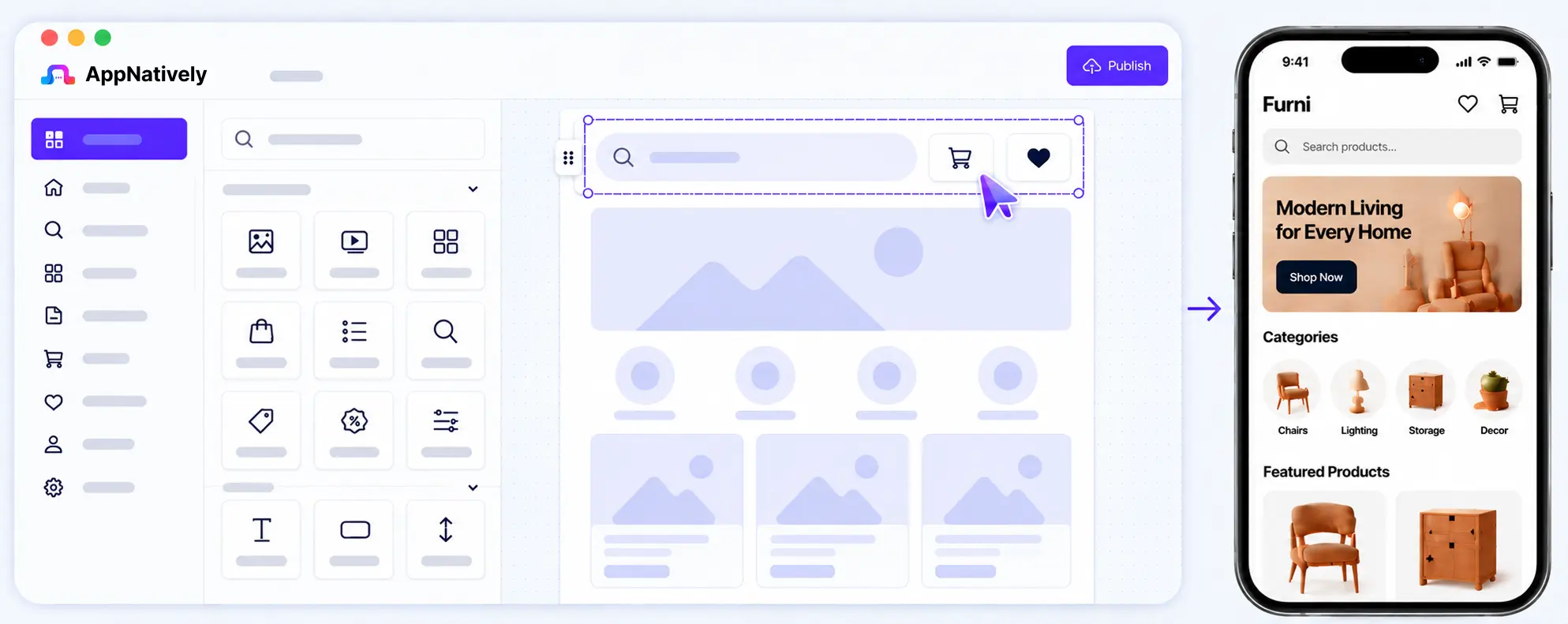
Add a search bar to the header and move the cart and wishlist icons there.
- Reading current header configuration
- Adding search component
- Moving cart icon to header
- Moving wishlist icon to header
- Updating spacing and layout
What your agent can do
It reads your project, then acts on it
Your agent is not only generating new things. It can inspect an app you already built, understand how it is put together, and change it in place.
Build
Create what is not there yet.
- Pages
- Sections
- Components
- Navigation
- Headers
- Drawers
Modify
Change what already exists.
- Layout
- Spacing
- Structure
- Styling
- Component settings
- Content
Understand
Read the project before touching it.
- Existing pages
- Project structure
- Available components
- Current theme
- Existing configuration
Configure
Wire screens to your business.
- Ecommerce
- Search
- Filters
- Product experience
- Listings
- Forms
Real examples
Turn ideas into complete app experiences
From simple changes to complete app builds, your AI agent works with AppNatively components to create real, production-ready apps.
- 1
Build complete pages
Create a full ecommerce homepage with banners, categories and product sections.
- 2
Modify existing apps
Move icons, update layouts, change components and refine designs through natural conversation.
- 3
Create advanced experiences
Add search, filters, listings, booking flows and more using your business data and AppNatively components.
Why it's different
Built for real apps, not just code.
General AI tools can generate code. AppNatively MCP works directly with your AppNatively project, components and integrations, so you get a real app, faster.
General AI coding
Code generation
Generates raw code that you have to integrate and maintain.
You manage the architecture
You need to set up project structure, dependencies and best practices.
Manual integration setup
You configure APIs, authentication and services from scratch.
Build configuration
You handle environments, native builds and publishing steps yourself.
AppNatively MCP
Structured AppNatively actions
Uses your AppNatively components, screens and best practices.
Works on a real AppNatively project
Understands and modifies your actual app, keeping it consistent and scalable.
Existing integrations
Connects with ready-to-use integrations like payments, maps, auth, and more.
You stay in charge of releases
Edits land in your draft, where you preview, build and publish. The agent never releases anything on its own.
One system. Many possibilities
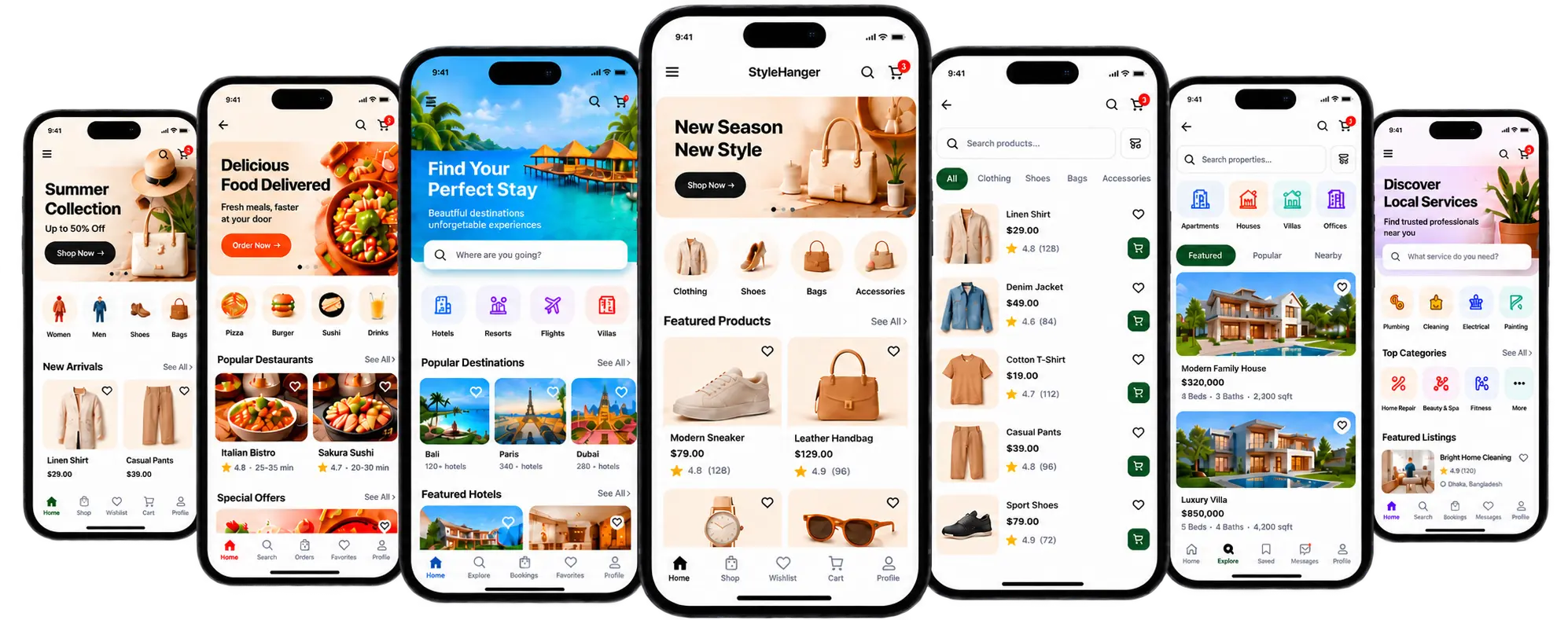
Structured components. Not fixed templates.
Use AppNatively's component library to create unique app experiences for any industry. The same system can power a fashion app, a marketplace, a restaurant app and more.
A smooth way to build
Start with AI. Continue visually.
Get to a working app quickly with AI, then refine every detail in the visual builder. It's a continuous loop: chat, update, design, preview, repeat.
- 1
Ask AI
Describe what you want to build or change.
- 2
AppNatively updates your project
MCP makes the changes in your real app.
- 3
Refine visually in the builder
Adjust components, styling and content.
- 4
Ask AI again
Keep iterating with natural language.
- 5
Preview your app
See your changes instantly on a real device.

Connect your data
Build on real business data
Connect your existing tools and data to give your AI agent real context. Create native apps that use your products, customers, orders and content, not just sample data.


Work with your favorite tools
Use your preferred AI client
AppNatively MCP Server works with any MCP-compatible client, so you can use the tools you already love.
- Claude
Anthropic Claude
- ChatGPT
OpenAI ChatGPT
- Cursor
Cursor IDE
- VS Code
Visual Studio Code
- Other Clients
Any MCP-compatible client
Under the hood
How AppNatively MCP works
A simple, open architecture that connects your AI client to your project, tools and real business data.
AI Client
Claude, ChatGPT, Cursor, VS Code...
MCP Protocol
Open standard for AI tools
AppNatively MCP Server
Understands your project, tools and business data
Project tools
Pages, components, theme, data, actions
AppNatively project
Your native app draft
Preview / Build / Publish
You release from the builder
Your step
- Project
- Pages
- Components
- Navigation
- Theme
- Data
- Actions
Your journey
From prompt to App Store
Turn a simple idea into a fully functional native app and keep it in sync as your business grows.
- 1
Connect business data
Link WooCommerce, SureCart or your directory plugin.
- 2
Ask AI
Describe what you want in plain language.
- 3
Build
AI uses AppNatively tools to create your app.
- 4
Customize
Refine pages, design and functionality.
- 5
Preview
See your native app in real time.
- 6
Publish
Build and submit to iOS and Android.
- 7
OTA updates
Ship supported changes without a new store review.
Built for everyone
Who it's for
Whether you're building your first app, shipping for a client, or extending an existing product, AppNatively MCP Server fits naturally into your workflow.
Founders & Business owners
Turn your ideas into real apps faster. Go from concept to working product without hiring a dev team.
Agencies
Deliver apps for your clients more efficiently. Create, modify, and iterate on multiple projects with ease.
Developers
Extend and customize apps, integrate with your workflow, and move faster with AI in your toolkit.
Security first
Security and control
Your projects, data, and actions stay in your control. AppNatively MCP Server is built with security, transparency, and safety in mind.
Secure authentication
Connect with your AppNatively account over OAuth 2.1, with PKCE required. Your password never reaches the AI client.
Workspace-scoped access
You pick one workspace when you approve a client. It sees the apps in that workspace and nothing else.
Never publishes or deletes apps
The agent edits pages and components in your draft. It cannot create or delete apps, publish, build, or reach billing, team and signing credentials.
Revoke any client
Disconnect a client from your workspace integrations. Its access ends within the hour, because tokens are short-lived.
Changes land in your draft
Every edit runs through the same builder operations the studio uses and is saved to your draft, so you review it before you release.
Get started fast
Setup in minutes
Connect AppNatively MCP Server to your favorite AI client and start building real apps right away.
- 1
Open or create an AppNatively project
Choose an existing project or create a new one in AppNatively.
My Projects+ New Project- Modern LivingUpdated 2 days ago
- Fitness TrackerUpdated 5 days ago
- Travel ExplorerUpdated 1 week ago
- 2
Add AppNatively MCP Server
Configure the AppNatively MCP Server in your AI client using our simple setup guide.
MCP Servers Add Server MCP Serverappnatively-mcp● Connected
 - 3
Authenticate
Sign in with your AppNatively account and grant the required permissions.
Connect to AppNativelyAllow your AI client to access your AppNatively projects.ContinueYou can revoke access at any time from your workspace integrations. - 4
Ask your AI to start building
Start a conversation and tell your AI what you want to build or change. Your real app gets updated in AppNatively.
Create a modern homepage for my travel app with a hero section, featured destinations and a newsletter signup.
I'll create a modern homepage for your travel app with a hero section, featured destinations and a newsletter signup.
FAQS
Frequently asked questions
Ready to build
Connect your AI to real apps today
Start using AppNatively MCP Server and turn your ideas into live apps, faster than ever.